
Back to prompt library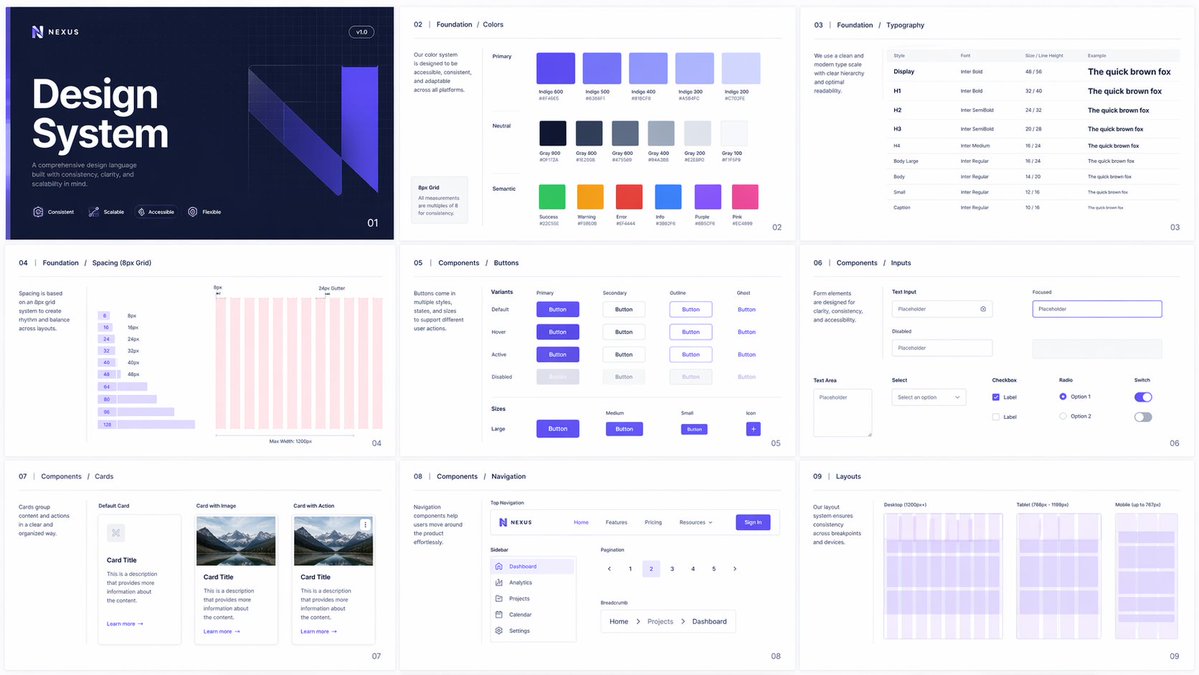


Prompt libraryImage Prompt
UI Style System Board
Create a multi-page UI style system board with an 8px grid, color tokens, typography scale, component states, and aligned layout examples.
Design systemUI kitTypography
Preview
Image Prompt
Recommended model
Seedream 5.0 Lite
Output format
Image prompt template
Preview
Image Prompt
Preview for UI Style System Board, focused on system consistency, grid alignment, editable tokens, and product-ready UI examples.
Full prompt
UI Style System Board
Multi-page UI style system board with 8px grid, color tokens, typography scale, components, and responsive layouts.
Recommended model: Seedream 5.0 LiteOutput format: Image prompt template
Full prompt
Image PromptCreate a polished multi-page UI style system board for [PRODUCT_OR_BRAND]. Present the system as a cohesive set of design pages on one clean preview canvas. Use a strict 8px spacing grid, consistent margins, precise alignment, and a clear hierarchy across every page. Include a color token panel with primary, secondary, neutral, semantic, and background swatches; a typography scale with heading, body, caption, and numeric styles; a component sheet with buttons, inputs, cards, navigation, badges, and empty states; and two responsive layout examples showing desktop and mobile proportions. Keep the system visually consistent, editable, and suitable for a SaaS product, creator tool, ecommerce brand, or internal dashboard. Use realistic placeholder copy only where needed, and keep labels short enough to remain readable. Avoid real logos, copied design systems, brand names not supplied by the user, distorted typography, inconsistent spacing, mismatched shadows, decorative clutter, inaccessible contrast, and component examples that break the grid.
Usage notes
Replace the product type, brand tone, palette direction, component list, layout examples, and accessibility requirements before running.
Prompt FAQ
Before you use this prompt
Quick checks for inputs, model fit, and how to adapt the template without weakening the result.
What should I customize first?
Define the product type, brand tone, base palette, typography personality, component scope, and whether the examples should feel marketing-led or dashboard-led.
Can this prompt create a usable design system?
It creates a visual style-system board for exploration and presentation. Review spacing, contrast, typography, and component behavior before converting it into production UI tokens.
What should I check before publishing the image?
Check that labels are readable, color swatches are distinct, type hierarchy is clear, components share the same spacing logic, and no real brand system was copied.
More prompts in this mode