
Back to prompt library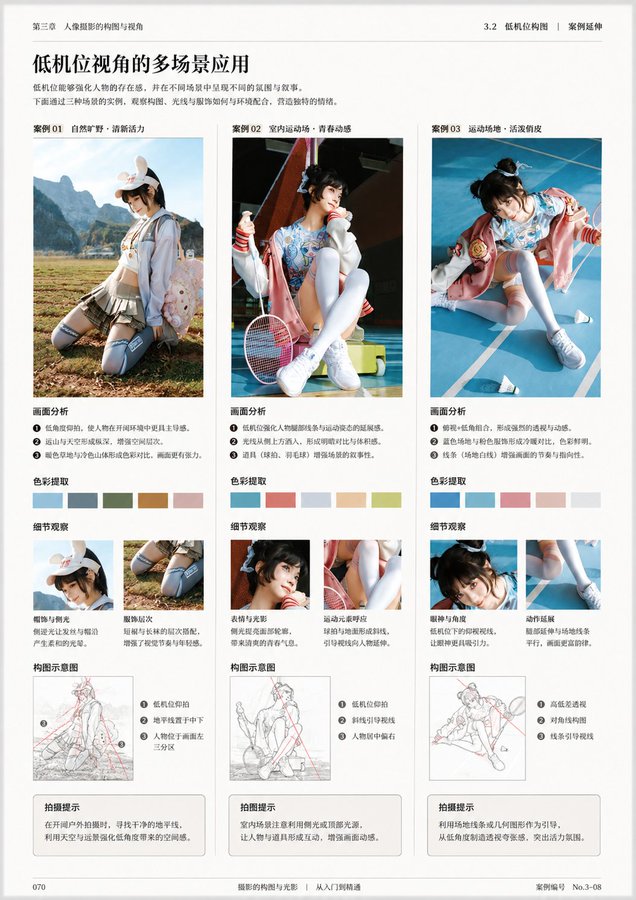


Prompt libraryImage Prompt
Professional Book Page Layout
A publication-ready layout prompt for book pages, manuals, and portfolio spreads with editorial hierarchy, margin grids, captions, and print-safe spacing.
PublishingLayoutEditorial
Preview
Image Prompt
Recommended model
Z-Image
Output format
Image prompt template
Preview
Image Prompt
Book layout preview focused on editorial hierarchy, margin discipline, caption legibility, editable placeholders, and print-ready delivery.
Full prompt
Professional Book Page Layout
Professional book page layout prompt with editable chapter topic, margin grid, visual panel, captions, page numbers, and print-safe spacing.
Recommended model: Z-ImageOutput format: Image prompt template
Full prompt
Image PromptDesign a finished editorial page layout for a professional book, manual, or portfolio spread. Define the chapter topic, page size, margin system, column grid, dominant visual panel, caption style, page number placement, section labels, and publication tone. Make the image and text areas feel planned by an editor, with readable hierarchy, clear negative space, and all titles, captions, and publisher marks kept as editable placeholders. Keep the page quiet, print-safe, and suitable for a design sample or publishing mockup. Avoid random lorem ipsum blocks, unreadable generated text, fixed author names, real publisher logos, celebrity references, unsupported claims, cramped margins, cropped captions, and decorative clutter that hides the editorial structure.
Usage notes
Replace the chapter topic, visual subject, page size, margin system, caption language, publication tone, and final print or portfolio use before generating.
Prompt FAQ
Before you use this prompt
Quick checks for inputs, model fit, and how to adapt the template without weakening the result.
What should I customize in Professional Book Page Layout?
Replace the chapter topic, visual subject, page size, margin system, caption language, publication tone, and delivery context; manually review every generated text area.
How should I review the image output?
Check hierarchy, margin consistency, caption legibility, editable placeholders, print-safe crop, accurate subject details, and any generated text or claims that need cleanup.
Can I use this prompt with another model?
Yes. Keep the editorial grid and print-safety checks, then adjust detail level, aspect ratio, and text constraints for the model you choose in Rivya.
More prompts in this mode