
Back to prompt library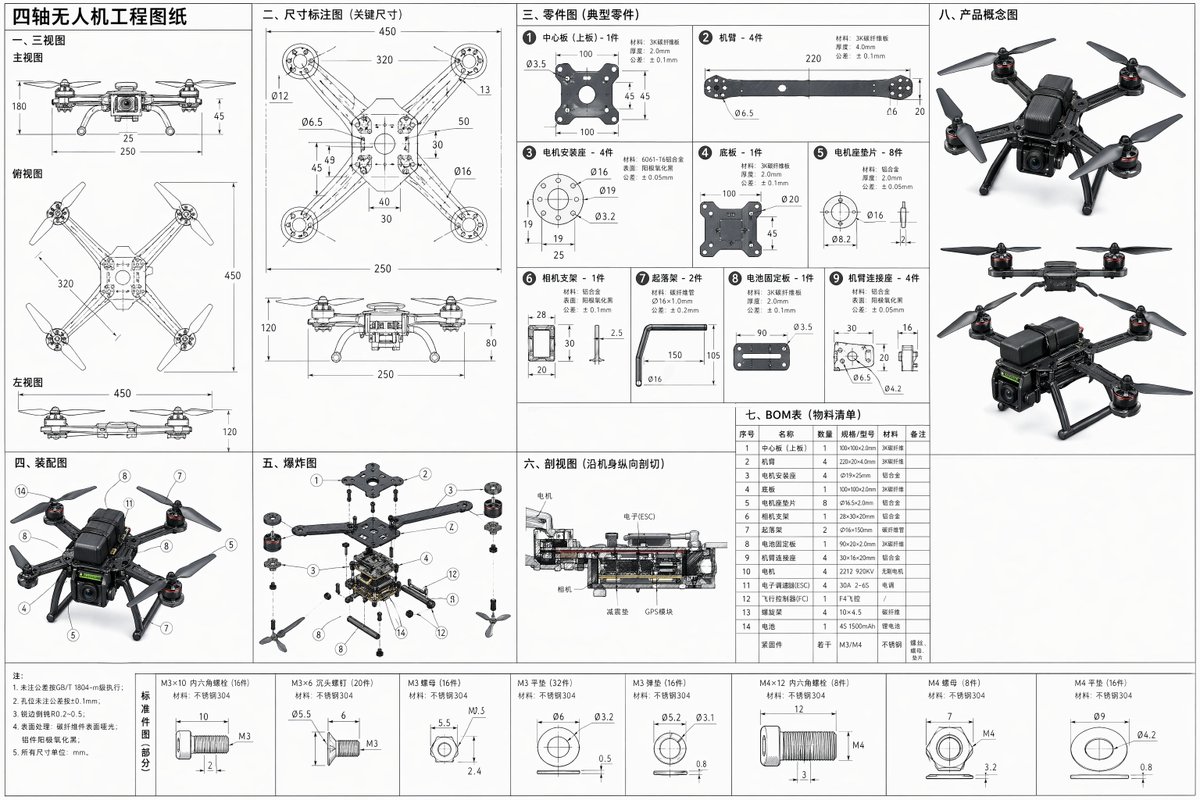


Prompt libraryImage Prompt
Quadcopter Engineering Blueprint Sheet
Create a full-dimension quadcopter engineering drawing prompt with three-view layout, separated parts, assembly notes, exploded view, cross-section, BOM table, and concept thumbnails.
BlueprintDroneTechnical
Preview
Image Prompt
Recommended model
Z-Image
Output format
Image prompt template
Preview
Image Prompt
A full quadcopter engineering sheet organized around orthographic views, part callouts, exploded assembly, cross-section, BOM, tolerances, and concept thumbnails.
Full prompt
Quadcopter Engineering Blueprint Sheet
Quadcopter engineering blueprint prompt with three-view drawings, separated parts, exploded assembly, cross-section, BOM table, dimensions, and corner concept sketches.
Recommended model: Z-ImageOutput format: Image prompt template
Full prompt
Image PromptCreate a clean full-dimension engineering blueprint sheet for a quadcopter drone. Arrange the page as a precise technical drawing with front, top, and left views that explain the 3D structure in 2D, then add separated part drawings for the frame, arms, motors, propellers, battery bay, camera mount, landing feet, screws, and shell panels. Include dimension callouts, hole positions, material notes, tolerances, alignment marks, and scale references. Add an assembly diagram showing how the parts fit together, an exploded assembly view that spaces components clearly to reveal structure, and a cross-sectional view that cuts through the internal battery, wiring, controller board, and mounting layers. Include a compact BOM table with part names, quantities, and specifications, plus a dimensional annotation area listing the key measurements needed for fabrication and repeatable prototyping. Place a few small product concept sketches in the corners. Use crisp black or blue engineering lines on a white or pale blueprint background, consistent line weights, readable arrows, clean grid guides, and generous margins. Avoid decorative sci-fi styling, fake logos, unreadable microtext, impossible dimensions, inconsistent scale, broken symmetry, missing propellers, tangled exploded parts, and photoreal product rendering that hides the drawing information.
Usage notes
Adjust the drone size, frame shape, motor count, sensor payload, material notes, tolerance level, sheet color, and annotation density before generating.
Prompt FAQ
Before you use this prompt
Quick checks for inputs, model fit, and how to adapt the template without weakening the result.
What should I customize in this quadcopter blueprint prompt?
Set the drone scale, arm geometry, motor size, battery bay, payload mount, material notes, tolerance level, and how dense the dimension callouts should be.
How should I review the blueprint output?
Check that front, top, and side views align, dimensions are plausible, exploded parts correspond to the assembled drone, the cross-section explains internal structure, and the BOM is readable.
Can I adapt it for another drone design?
Yes. Keep the engineering sheet structure and replace the frame layout, rotor count, payload module, materials, dimensions, and concept thumbnails for the new design.
More prompts in this mode