
प्रॉम्प्ट लाइब्रेरी पर वापस जाएं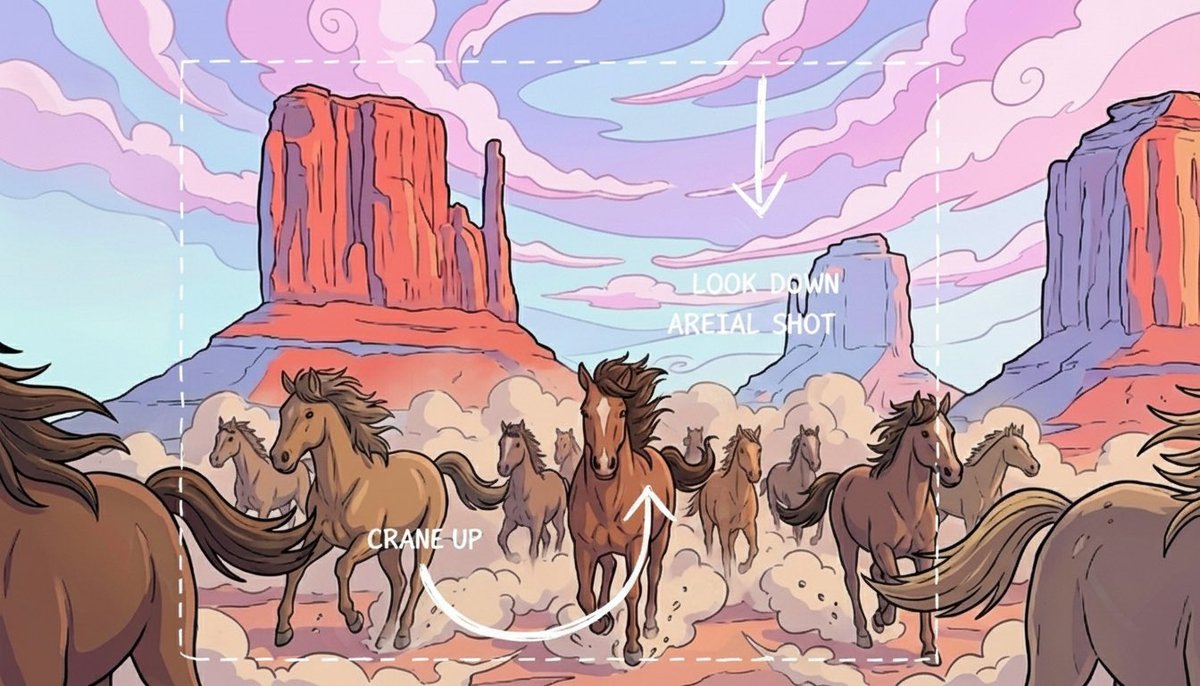


प्रॉम्प्ट लाइब्रेरीइमेज प्रॉम्प्ट
कैमरा move sketch annotation board
still frame को clean director annotation board में बदलें, जो camera movement, framing और final shot intent समझाए।
shot directionannotation marksstoryboard योजना
प्रीव्यू
इमेज प्रॉम्प्ट
सुझाया गया मॉडल
Nano Banana Pro
आउटपुट प्रारूप
इमेज प्रॉम्प्ट टेम्पलेट
प्रीव्यू
इमेज प्रॉम्प्ट
Camera Move Sketch Annotation Board का preview, जो shot planning, motion clarity और readable overlays पर केंद्रित है।
पूरा प्रॉम्प्ट
कैमरा move sketch annotation board
arrows, motion arcs, framing boxes, numbered callouts और clear final aerial shot plan वाला director-style camera movement annotation board।
सुझाया गया मॉडल: Nano Banana Proआउटपुट प्रारूप: इमेज प्रॉम्प्ट टेम्पलेट
पूरा प्रॉम्प्ट
इमेज प्रॉम्प्ट[REFERENCE_FRAME_OR_SCENE] के ऊपर production-ready image annotation board बनाएं। base frame को recognizable रखें, फिर clean hand-drawn sketch marks जोड़ें जो planned camera move समझाएं: start position, crane या rise path, tilt direction, look-down angle, final aerial या overhead framing, और वह subject जिसे focus में रहना चाहिए। thin arrows, numbered callouts, horizon guides, transparent motion arcs, framing boxes और छोटा editable notes area उपयोग करें। annotations को decorative doodles नहीं, बल्कि director shot-planning overlay जैसा बनाएं। marks के नीचे important faces, products, architecture और readable scene structure preserve करें। restrained colors जैसे white, cyan, yellow या red केवल वहां इस्तेमाल करें जहां वे motion को clarify करते हों। fake interface chrome, dense paragraphs, brand logos, permanent subtitles, inaccurate physics, scene perspective से contradict करने वाले arrows, illegible micro text या key subject को cover करने वाली scribbles से बचें।
उपयोग नोट
चलाने से पहले reference frame, movement path, final angle, focal subject, annotation colors और note labels बदलें।
प्रॉम्प्ट के अक्सर पूछे जाने वाले सवाल
इस प्रॉम्प्ट का उपयोग करने से पहले
इनपुट, मॉडल की उपयुक्तता और नतीजा कमजोर किए बिना टेम्पलेट बदलने के तरीके की तेज जांच।
यह doodle overlay से कैसे अलग है?
यह director notes के लिए बनाया गया है: हर arrow, guide, callout और frame box को camera position, movement या final composition समझाना चाहिए।
इसे चलाने से पहले क्या specify करना चाहिए?
starting camera position, movement path, tilt या pan direction, final framing, focal subject और editable रहने वाले labels define करें।
क्या avoid करना चाहिए?
dense text, decorative scribbles, fake UI chrome, scene perspective से लड़ने वाले arrows और main subject को छिपाने वाले marks से बचें।
इस मोड के और प्रॉम्प्ट