
Prompt library-তে ফিরে যান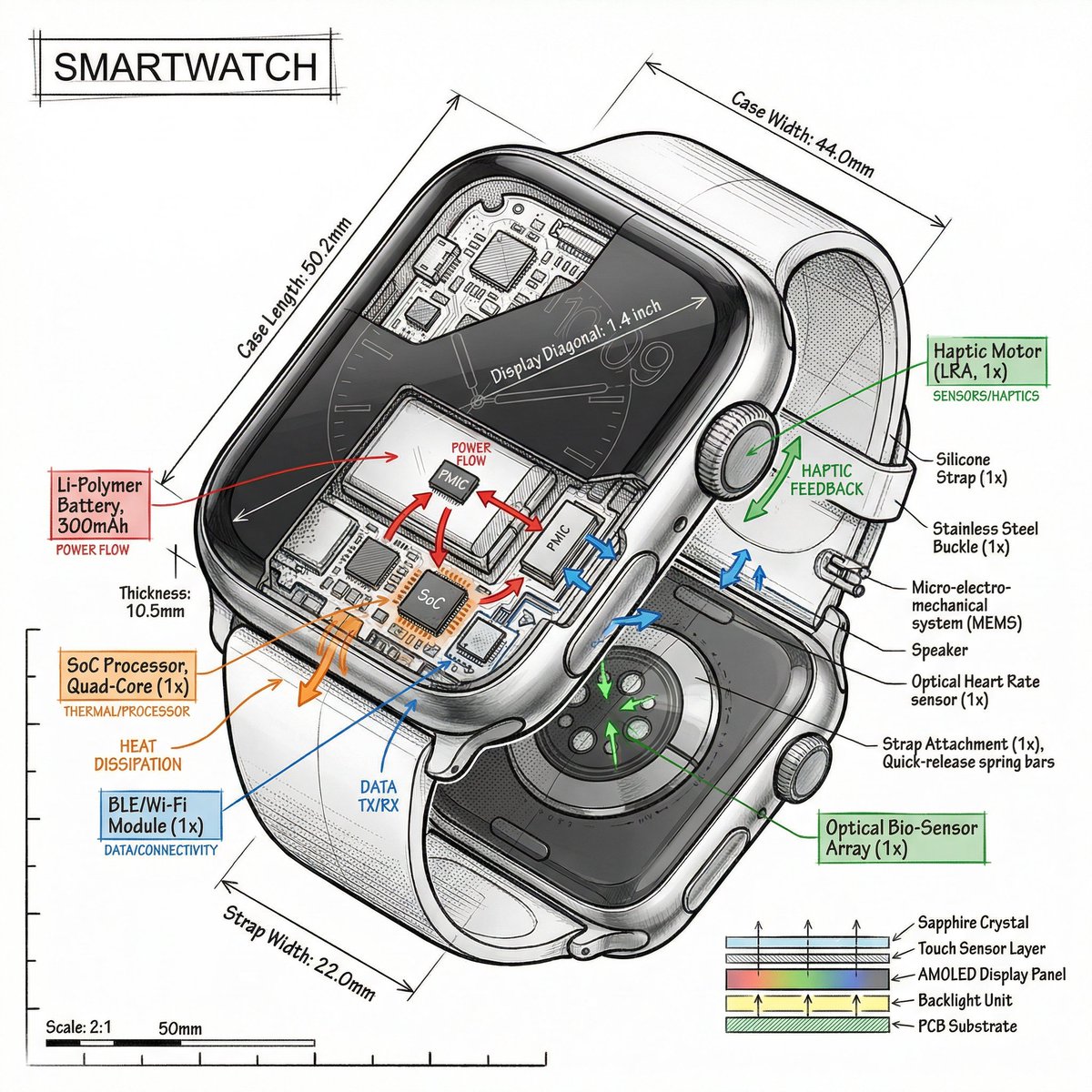


Prompt libraryImage Prompt
আইসোমেট্রিক ডিভাইস টিয়ারডাউন ইনফোগ্রাফিক
cutaway, callout এবং function arrow দিয়ে কোনো device ব্যাখ্যা করে এমন পরিষ্কার isometric technical infographic তৈরি করুন।
আইসোমেট্রিকটিয়ারডাউনটেকনিক্যাল ইনফোগ্রাফিক
Preview
Image Prompt
Recommended model
GPT Image 2
Output format
ইমেজ প্রম্পট টেমপ্লেট
Preview
Image Prompt
component clarity, isometric depth এবং editable callout-কেন্দ্রিক isometric device teardown infographic preview।
সম্পূর্ণ প্রম্পট
আইসোমেট্রিক ডিভাইস টিয়ারডাউন ইনফোগ্রাফিক
realistic render, cutaway layer, technical callout এবং restrained function color সহ isometric device teardown infographic।
Recommended model: GPT Image 2Output format: ইমেজ প্রম্পট টেমপ্লেট
সম্পূর্ণ প্রম্পট
Image Prompt[DEVICE_OR_PRODUCT]-এর জন্য pure white বা খুব light background-এ 45-degree isometric 3D view ব্যবহার করে polished 1:1 technical infographic তৈরি করুন। object-টি সামান্য tilted রাখুন, যাতে exterior form, internal architecture এবং component depth সহজে পড়া যায়। realistic product render-এর সঙ্গে precise black technical linework, transparent cutaway window, দরকার হলে exploded component layer এবং compact editable callout box মিলিয়ে দিন। function আলাদা করতে restrained accent color ব্যবহার করুন: power বা battery, data বা connectivity, thermal বা processor flow, sensor বা control, এবং structural material। device বোঝাতে সাহায্য করলে small title box, কয়েকটি scale marker, material note এবং simple schematic inset যোগ করুন। layout museum-exhibit-এর মতো clean রাখুন, balanced negative space দিন এবং viewer যত label পড়তে পারে তার বেশি label দেবেন না। real brand name, copied product logo, fake certification mark, unreadable micro text, impossible component order, excessive arrow, misleading measurement এবং described object-এর সঙ্গে সম্পর্কহীন decorative sci-fi part এড়িয়ে চলুন।
ব্যবহারের নোট
চালানোর আগে device, real component list, function color key, title language, measurement এবং allowed technical claim বদলে নিন।
প্রম্পট FAQ
এই prompt ব্যবহার করার আগে
Input, model fit এবং result দুর্বল না করে template adapt করার উপায় দ্রুত যাচাই করুন।
এই prompt কোন device-এর জন্য সবচেয়ে ভালো কাজ করে?
small electronics, tool, appliance, hardware module, medical-style device এবং visible functional layer থাকা product concept-এর জন্য এটি ভালো কাজ করে।
teardown কীভাবে believable রাখব?
real component list দিন, part-গুলো object structure-এর সঙ্গে aligned রাখুন, এবং যেসব internal part যুক্তিসঙ্গতভাবে describe করতে পারবেন না সেগুলোর label সরিয়ে দিন।
brand বা certification label ব্যবহার করতে পারি?
শুধু আপনার own বা verified label ব্যবহার করুন। না হলে সব mark generic, editable এবং technical claim থেকে স্পষ্টভাবে আলাদা রাখুন।
এই mode-এর আরও prompt