
Prompt library-তে ফিরে যান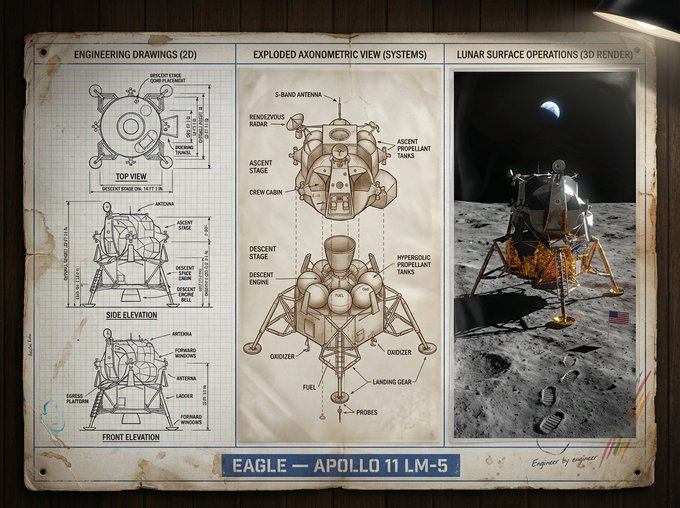


Prompt libraryImage Prompt
ইন্ডাস্ট্রিয়াল ডিজাইন প্রেজেন্টেশন বোর্ড
technical drawing, exploded axonometric diagram এবং photoreal product render মিলিয়ে museum-grade presentation board তৈরি করুন।
ইন্ডাস্ট্রিয়াল ডিজাইনপ্রেজেন্টেশন বোর্ডএক্সপ্লোডেড ভিউ
Preview
Image Prompt
Recommended model
4o Image
Output format
ইমেজ প্রম্পট টেমপ্লেট
Preview
Image Prompt
controlled technical layout, exploded-view structure, label এবং final render fidelity-তে মনোযোগী Industrial Design Presentation Board-এর preview।
সম্পূর্ণ প্রম্পট
ইন্ডাস্ট্রিয়াল ডিজাইন প্রেজেন্টেশন বোর্ড
technical drawing, exploded axonometric part এবং finished 3D product render সহ landscape industrial design board।
Recommended model: 4o ImageOutput format: ইমেজ প্রম্পট টেমপ্লেট
সম্পূর্ণ প্রম্পট
Image Promptexpert [DESIGN_DISCIPLINE] team দ্বারা designed [PRODUCT_OR_OBJECT]-এর জন্য একটি landscape industrial design presentation board তৈরি করুন। clean three-zone grid ব্যবহার করুন: left side-এ front, side, top, section, dimension, callout, scale mark এবং material note সহ black-and-white 2D technical drawing দেখান; center-এ exploded axonometric diagram দেখান, যেখানে major shell, frame, fastener, electronics, mechanical part অথবা user-specified internal component আলাদা করা থাকে এবং numbered leader line দিয়ে চিহ্নিত থাকে; right side-এ relevant environment-এ finished object-এর photorealistic 3D render দেখান, controlled lighting, accurate proportion, believable material এবং subtle atmospheric color সহ। editable title, year, variant, discipline এবং short tagline সহ restrained title block যোগ করুন। left side-এর archive-grade technical tone থেকে right side-এর richer cinematic realism-এ visual language transition করান, কিন্তু একটাই consistent grid, margin system এবং label style বজায় রাখুন। precise linework, legible annotation, realistic bevel ও seam, neutral paper texture এবং high-resolution product-detail fidelity ব্যবহার করুন। real brand name, copied patent drawing, fake certification stamp, unreadable microtext, impossible assembly order, inconsistent component scale, decorative clutter, arbitrary logo এবং edit করা যায় না এমন title text এড়িয়ে চলুন।
ব্যবহারের নোট
রান করার আগে product, design discipline, component list, material system, environment, title block এবং final aspect ratio বদলে নিন।
প্রম্পট FAQ
এই prompt ব্যবহার করার আগে
Input, model fit এবং result দুর্বল না করে template adapt করার উপায় দ্রুত যাচাই করুন।
এই প্রম্পট কোন object-এর জন্য ভালো কাজ করে?
component list পরিষ্কার হলে product, vehicle, tool, furniture, device, exhibit object এবং speculative hardware-এর জন্য এটি ভালো কাজ করে।
label readable রাখব কীভাবে?
short editable label ব্যবহার করুন, callout সংখ্যা সীমিত রাখুন এবং dense paragraph-এর বদলে বড় annotation block চাইুন।
publish করার আগে কী review করব?
component scale, assembly logic, dimension consistency, label spelling এবং final render এখনও technical drawing-এর সঙ্গে মেলে কি না পরীক্ষা করুন।
এই mode-এর আরও prompt