
Prompt library پر واپس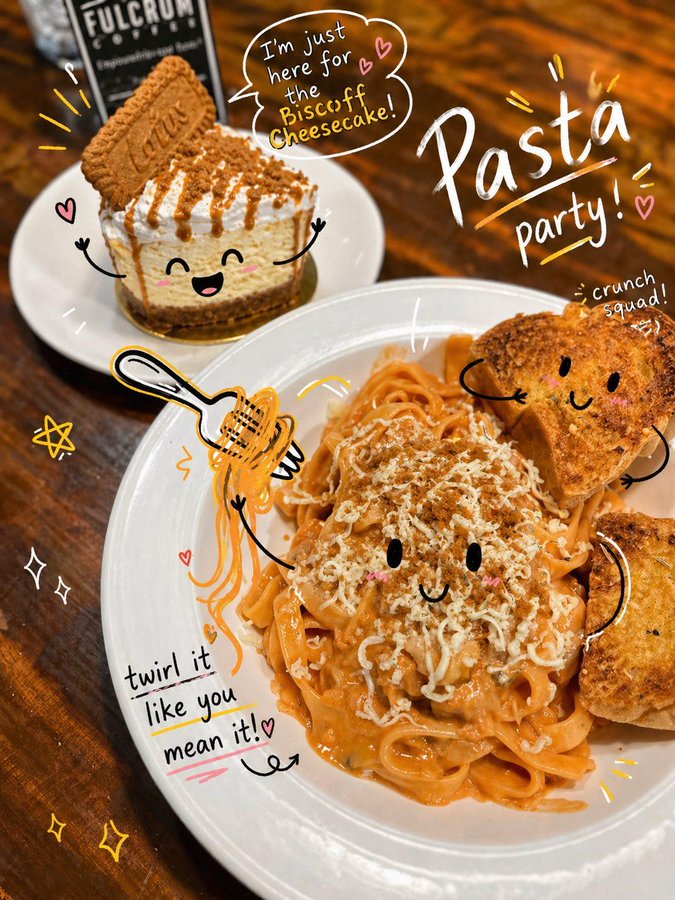


Prompt libraryImage Prompt
شوخ ڈوڈل فوٹو اینوٹیشن
کسی photo یا social image کو hand-drawn arrows، circles، doodle marks، قابل تدوین note areas، اور صاف delivery crop کے ساتھ ایک شوخ annotated key visual میں بدلیں۔
اینوٹیشنڈوڈلسوشل
Preview
Image Prompt
Recommended model
Seedream 5.0 Lite
Output format
امیج پرامپٹ ٹیمپلیٹ
Preview
Image Prompt
Photo annotation پری ویو، clear subject focus، playful doodle marks، readable notes، قابل تدوین text areas، اور safe social cropping پر مرکوز۔
Full prompt
شوخ ڈوڈل فوٹو اینوٹیشن
ڈوڈل فوٹو اینوٹیشن پرامپٹ، قابل تدوین photo subject، hand-drawn arrows، circles، note areas، social crop، اور brand-safe review checks کے ساتھ۔
Recommended model: Seedream 5.0 LiteOutput format: امیج پرامپٹ ٹیمپلیٹ
Full prompt
Image Promptشوخ ڈوڈل فوٹو اینوٹیشن کے لیے production-ready image prompt ڈیزائن کریں۔ قابل تدوین photo subject، setting، supporting props، doodle marks، annotation labels، composition، camera angle، lighting direction، color palette، aspect ratio، اور intended delivery use واضح کریں۔ image کو social-ready photo کے طور پر بنائیں جس میں hand-drawn arrows، circles، underlines، stickers، اور margin notes subject کی طرف اشارہ کریں مگر key details کو نہ ڈھانپیں۔ تمام notes، icons، اور marks قابل تدوین رکھیں، captions کے لیے readable negative space چھوڑیں، اور brand adaptation کے لیے جگہ محفوظ رکھیں۔ distorted handwriting، fixed logos، real brand names، celebrity likenesses، protected characters، unsupported claims، cluttered backgrounds، mismatched doodles، اور photo subject سے unrelated marks سے بچیں۔
Usage notes
photo subject، scene، doodle style، annotation labels، palette، camera angle، aspect ratio، اور final social یا delivery use کو بدلیں۔
Prompt FAQ
یہ prompt استعمال کرنے سے پہلے
Inputs، model fit اور template adapt کرنے کے طریقے کو جلد check کریں تاکہ result کمزور نہ ہو۔
شوخ ڈوڈل فوٹو اینوٹیشن میں کیا تبدیل کرنا چاہیے؟
photo subject، scene، supporting props، doodle style، annotation labels، palette، camera angle، aspect ratio، اور final social یا delivery use کو بدلیں۔
image output کا جائزہ کیسے لینا چاہیے؟
photo clarity، doodle placement، annotation readability، قابل تدوین text اور marks، crop safety، brand safety، اور یہ دیکھیں کہ unwanted logos، distorted handwriting، یا unsupported claims تو ظاہر نہیں ہوئے۔
کیا اسے کسی دوسری campaign کے لیے ڈھالا جا سکتا ہے؟
ہاں۔ photo-plus-doodle annotation structure اور review checks برقرار رکھیں، پھر جس campaign کو آپ بنا رہے ہیں اس کے لیے subject، scene، palette، annotation tone، اور delivery format بدل دیں۔
اس mode میں مزید prompts