
Prompt library پر واپس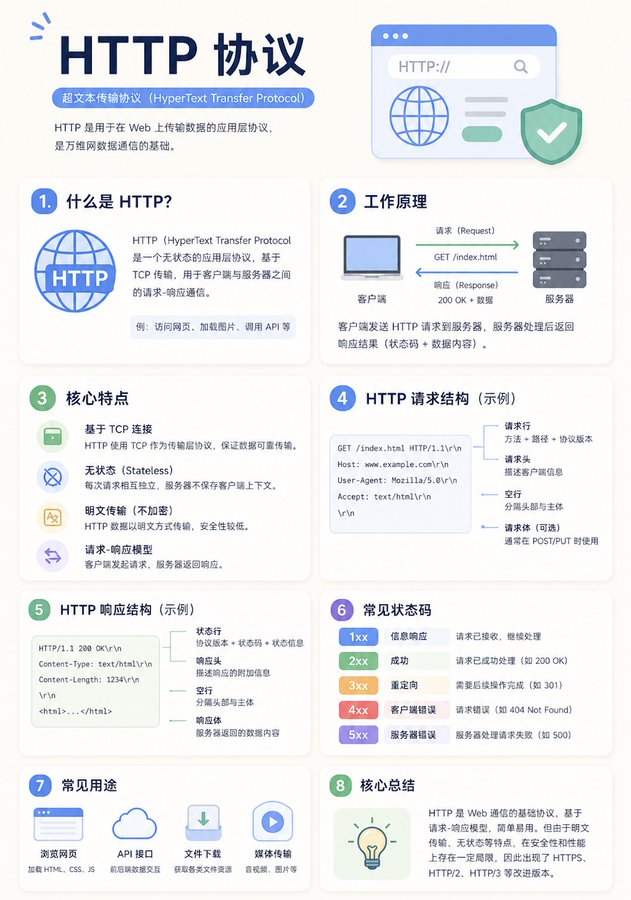


Prompt libraryImage Prompt
minimalist education infographic board بریف
کسی knowledge topic کو پرسکون educational infographic میں منظم کریں، adaptive cards، hierarchy، examples، اور readable spacing کے ساتھ۔
infographiceducationlayout
Preview
Image Prompt
Recommended model
Qwen2 Image
Output format
امیج پرامپٹ ٹیمپلیٹ
Preview
Image Prompt
Infographic board جو logic، spacing، hierarchy، examples، اور long-read comfort پر مرکوز ہے۔
Full prompt
minimalist education infographic board بریف
Education infographic prompt: topic structure، adaptive cards، hierarchy، examples، اور readability checks۔
Recommended model: Qwen2 ImageOutput format: امیج پرامپٹ ٹیمپلیٹ
Full prompt
Image Prompt[KNOWLEDGE TOPIC] کی وضاحت کرنے والا minimalist educational infographic بنائیں۔ modules کو fixed number پر مجبور کرنے کے بجائے topic structure کے مطابق منظم کریں۔ soft light background، white cards، consistent spacing، clear headings، short explanations، اور simple icons یا diagrams صرف وہاں استعمال کریں جہاں وہ content کو واضح کریں۔ layout کو content کے مطابق adapt کریں: definition، comparison، process، system map، یا common mistakes۔ symmetry سے پہلے reading comfort اور logic کو ترجیح دیں۔ dense paragraphs، over-saturated colors، decorative icons، tiny text، اور unsupported claims سے بچیں۔
Usage notes
topic، audience level، module type، color accent، language، اور final aspect ratio تبدیل کریں۔
Prompt FAQ
یہ prompt استعمال کرنے سے پہلے
Inputs، model fit اور template adapt کرنے کے طریقے کو جلد check کریں تاکہ result کمزور نہ ہو۔
Minimalist Education Infographic Board میں مجھے کیا تبدیل کرنا چاہیے؟
topic، audience level، module type، color accent، language، اور final aspect ratio تبدیل کریں۔
image output کا جائزہ کیسے لینا چاہیے؟
composition، lighting، crop، subject accuracy، readable text، اور ایسے claims یا labels چیک کریں جنہیں manual cleanup چاہیے۔
کیا میں یہ prompt کسی اور model کے ساتھ استعمال کر سکتا ہوں؟
ہاں۔ core structure برقرار رکھیں، پھر Rivya میں اپنے منتخب model کے لیے detail level، aspect ratio، اور constraints adjust کریں۔
اس mode میں مزید prompts