
Prompt library پر واپس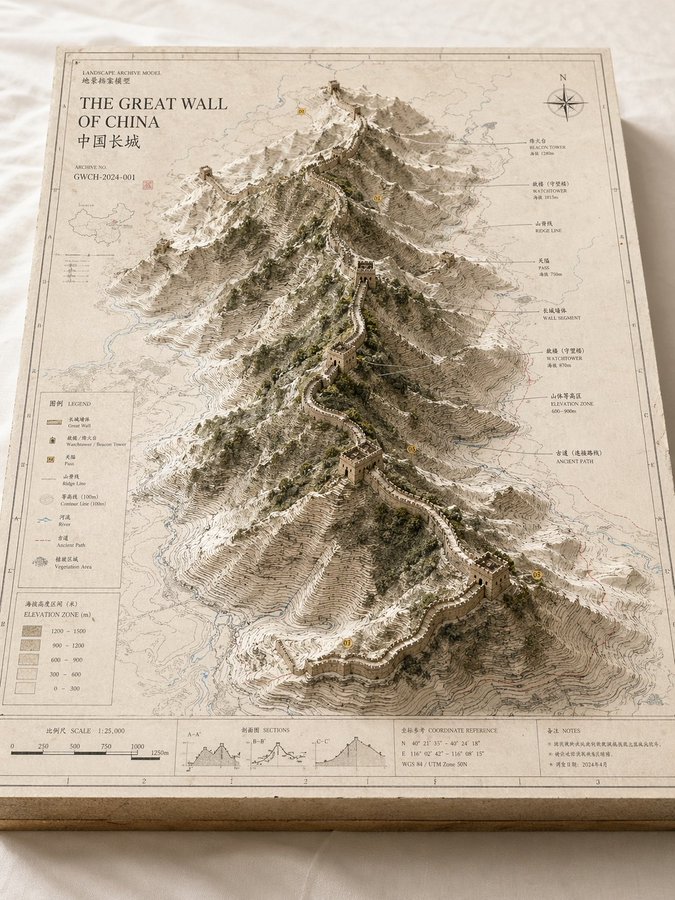


Prompt libraryImage Prompt
لینڈ اسکیپ آرکائیو سینڈ باکس ماڈل
ایک museum-like landform یا city model بنائیں جو 2D map layers، raised terrain، labels اور restrained archival styling کو یکجا کرے۔
نقشہماڈلمعماری
Preview
Image Prompt
Recommended model
Midjourney
Output format
تصویری پرامپٹ ٹیمپلیٹ
Preview
Image Prompt
terrain structure، map layers، restrained labels، اور exhibit texture پر مرکوز model board۔
Full prompt
لینڈ اسکیپ آرکائیو سینڈ باکس ماڈل
Landscape model prompt: map board، contour lines، raised terrain، labels، material palette، اور exhibit feel۔
Recommended model: MidjourneyOutput format: تصویری پرامپٹ ٹیمپلیٹ
Full prompt
Image Prompt[PLACE OR WORLD] کے لیے ایک high-finish landscape archive model بنائیں۔ صاف table پر ایک rectangular model board دکھائیں، جس میں 2D map layers، contour lines، routes، water systems، district boundaries، اور raised central terrain یا city form شامل ہوں۔ ماڈل کو geographic research exhibit، urban planning sandbox، یا worldbuilding reference جیسا محسوس ہونا چاہیے۔ off-white board، pale gray، sand، moss green، اور fine black annotation lines جیسے restrained materials استعمال کریں۔ labels کم اور readable رکھیں۔ fantasy clutter، random icons، exaggerated height، messy text، اور decorative map noise سے بچیں۔
Usage notes
place، terrain type، focus layer، annotation language، palette، اور aspect ratio تبدیل کریں۔
Prompt FAQ
یہ prompt استعمال کرنے سے پہلے
Inputs، model fit اور template adapt کرنے کے طریقے کو جلد check کریں تاکہ result کمزور نہ ہو۔
Landscape Archive Sandbox Model میں مجھے کیا customize کرنا چاہیے؟
place، terrain type، focus layer، annotation language، palette، اور aspect ratio تبدیل کریں۔
مجھے image output کا جائزہ کیسے لینا چاہیے؟
composition، lighting، crop، subject accuracy، readable text، اور ایسے claims یا labels چیک کریں جنہیں manual cleanup کی ضرورت ہو۔
کیا میں یہ prompt کسی دوسرے model کے ساتھ استعمال کر سکتا ہوں؟
ہاں۔ core structure برقرار رکھیں، پھر Rivya میں منتخب model کے لیے detail level، aspect ratio، اور constraints adjust کریں۔
اس mode میں مزید prompts