
Prompt library پر واپس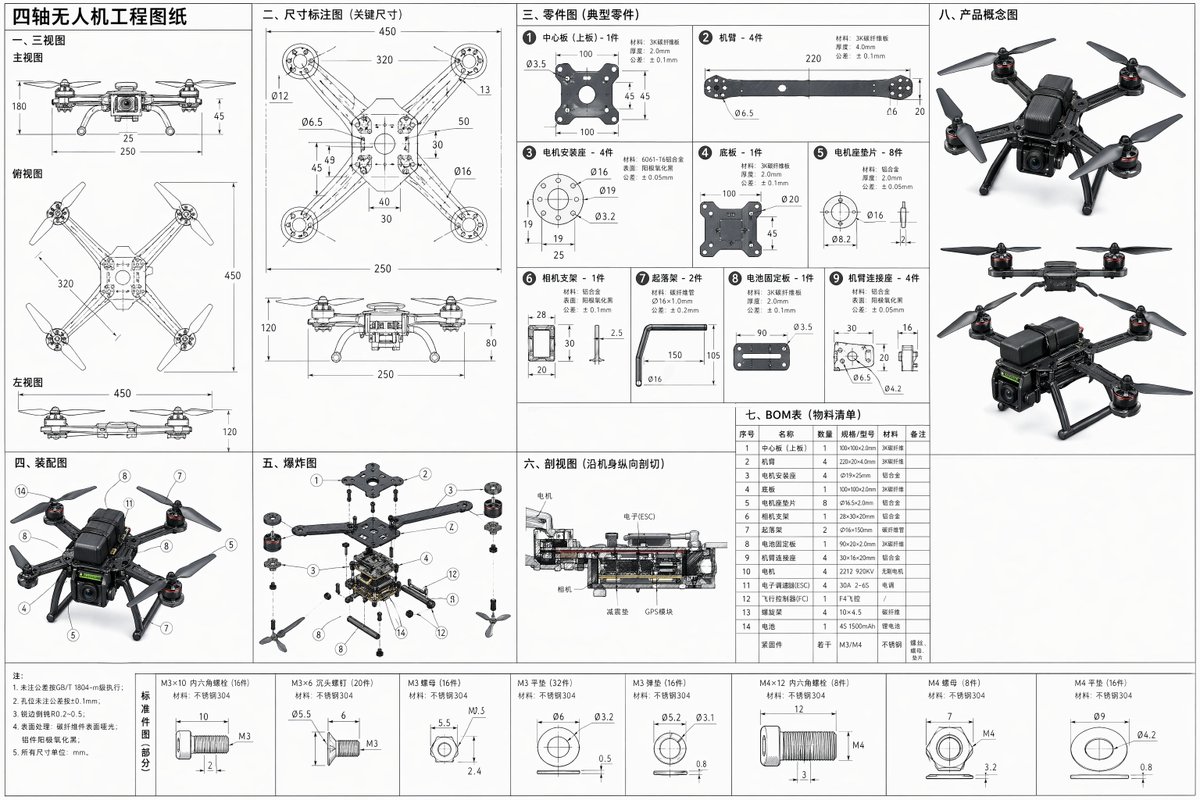


Prompt libraryImage Prompt
کواڈ کاپٹر انجینئرنگ بلیو پرنٹ شیٹ
Three-view layout، separated parts، assembly notes، exploded view، cross-section، BOM table اور concept thumbnails کے ساتھ full-dimension کواڈ کاپٹر engineering drawing prompt بنائیں۔
بلیو پرنٹڈرونٹیکنیکل
Preview
Image Prompt
Recommended model
Z-Image
Output format
امیج پرامپٹ ٹیمپلیٹ
Preview
Image Prompt
مکمل کواڈ کاپٹر engineering sheet، orthographic views، part callouts، exploded assembly، cross-section، BOM، tolerances اور concept thumbnails کے گرد organized۔
Full prompt
کواڈ کاپٹر انجینئرنگ بلیو پرنٹ شیٹ
Three-view drawings، separated parts، exploded assembly، cross-section، BOM table، dimensions اور corner concept sketches کے ساتھ کواڈ کاپٹر engineering blueprint prompt۔
Recommended model: Z-ImageOutput format: امیج پرامپٹ ٹیمپلیٹ
Full prompt
Image PromptQuadcopter drone کے لیے clean full-dimension engineering blueprint sheet بنائیں۔ Page کو precise technical drawing کی طرح arrange کریں، front، top اور left views کے ساتھ جو 3D structure کو 2D میں explain کریں، پھر frame، arms، motors، propellers، battery bay، camera mount، landing feet، screws اور shell panels کے separated part drawings شامل کریں۔ Dimension callouts، hole positions، material notes، tolerances، alignment marks اور scale references شامل کریں۔ Parts کے fit ہونے کا assembly diagram، components کو clear spacing میں دکھانے والا exploded assembly view، اور internal battery، wiring، controller board اور mounting layers کو cut کرنے والا cross-sectional view شامل کریں۔ Part names، quantities اور specifications کے ساتھ compact BOM table شامل کریں، نیز fabrication اور repeatable prototyping کے لیے key measurements listed کرنے والا dimensional annotation area رکھیں۔ Corners میں چند small product concept sketches رکھیں۔ White یا pale blueprint background پر crisp black یا blue engineering lines، consistent line weights، readable arrows، clean grid guides اور generous margins استعمال کریں۔ Decorative sci-fi styling، fake logos، unreadable microtext، impossible dimensions، inconsistent scale، broken symmetry، missing propellers، tangled exploded parts، اور ایسی photoreal product rendering سے بچیں جو drawing information کو hide کر دے۔
Usage notes
Generate کرنے سے پہلے drone size، frame shape، motor count، sensor payload، material notes، tolerance level، sheet color اور annotation density adjust کریں۔
Prompt FAQ
یہ prompt استعمال کرنے سے پہلے
Inputs، model fit اور template adapt کرنے کے طریقے کو جلد check کریں تاکہ result کمزور نہ ہو۔
اس quadcopter blueprint prompt میں مجھے کیا customize کرنا چاہیے؟
Drone scale، arm geometry، motor size، battery bay، payload mount، material notes، tolerance level اور dimension callouts کی density set کریں۔
مجھے blueprint output کیسے review کرنا چاہیے؟
Check کریں کہ front، top اور side views align ہیں، dimensions plausible ہیں، exploded parts assembled drone سے correspond کرتے ہیں، cross-section internal structure explain کرتا ہے، اور BOM readable ہے۔
کیا میں اسے کسی اور drone design کے لیے adapt کر سکتا ہوں؟
ہاں۔ Engineering sheet structure برقرار رکھیں اور نئے design کے لیے frame layout، rotor count، payload module، materials، dimensions اور concept thumbnails replace کریں۔
اس mode میں مزید prompts